
FPDF Table class that allows creation of Tables in a very simple way.
Features:
- Minimal extension of Fpdf Class
- Every table cell is a fully featured Fpdf Multicell
- Vertical and horizontal alignment
- Column and row spans
- Automatic split on page-break
- Automatic table header on new page
- Easy configuration
- Advanced split modes
- Transparency
- Support for images
Requirements:
- PHP version > 5.3.0
Resources:
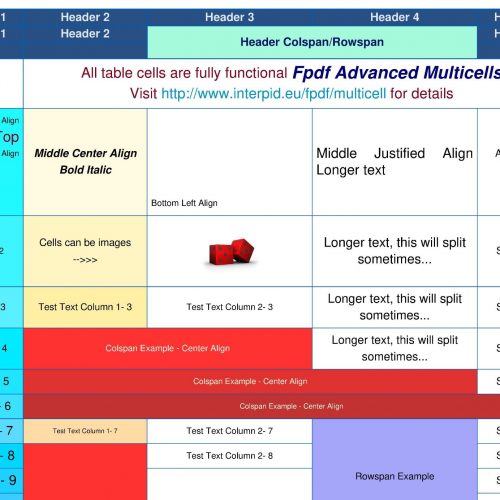
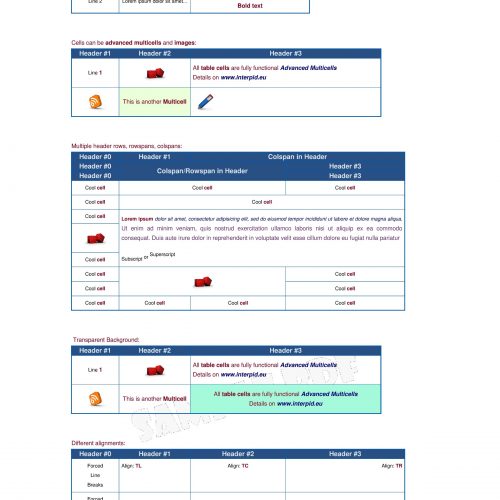
Pdf example #1:
<?php
use Interpid\PdfLib\Table;
$table = new Table($pdf);
$table->setStyle('p', 7, '', '130,0,30', 'helvetica');
$table->setStyle('b', 7, 'B', '130,0,30', 'helvetica');
$columns = 3;
/**
* Set the tag styles
*/
$table->initialize([20, 30, 50]);
$header = array(
['TEXT' => 'Header #1'],
['TEXT' => 'Header #2'],
['TEXT' => 'Header #3'],
);
//add the header row
$table->addHeader($header);
for ($j = 1; $j < 3; $j++) {
$row = [];
$row[0]['TEXT'] = "Line $j";
$row[1]['TEXT'] = "Lorem ipsum dolor sit amet...";
$row[2]['TEXT'] = "<p>Simple text\n<b>Bold text</b></p>";
//add the data row
$table->addRow($row);
}
//close the table
$table->close();
Code language: PHP (php)<?php
require('settings.php');
use Interpid\PdfLib\Table;
$table = new Table($pdf);
$table->setStyle('p', 7, '', '130,0,30', 'helvetica');
$table->setStyle('b', 7, 'B', '130,0,30', 'helvetica');
$table->setStyle('bi', 7, 'BI', '0,0,120', 'helvetica');
$columns = 3;
/**
* Set the tag styles
*/
$table->initialize([20, 30, 80]);
$header = [
['TEXT' => 'Header #1'],
['TEXT' => 'Header #2'],
['TEXT' => 'Header #3']
];
//add the header row
$table->addHeader($header);
$imageCell = [
'TYPE' => 'IMAGE',
'FILE' => PDF_RESOURCES_IMAGES . '/dice.jpg',
'WIDTH' => 10
];
//row 1 - add data as Array
$row = [];
$row[0]['TEXT'] = "Line <b>1</b>";
$row[1] = array(
'TYPE' => 'IMAGE',
'FILE' => PDF_RESOURCES_IMAGES . '/dice.jpg',
'WIDTH' => 10
);
$row[2]['TEXT'] = "<p>All <b>table cells</b> are fully functional <bi>Advanced Multicells</bi>\nDetails on <bi href='http://www.interpid.eu'>www.interpid.eu</bi></p>";
$row[2]['ALIGN'] = 'L';
//add the data row
$table->addRow($row);
//row 2 - add data as Objects
$row = [];
//alternatively you can create directly the cell object
$row[0] = new Table\Cell\Image($pdf, PDF_RESOURCES_IMAGES . '/blog.jpg', 10);
$row[1] = array(
'TEXT' => "<p>This is another <b>Multicell</b></p>",
'BACKGROUND_COLOR' => $aColor[0]
);
$row[2] = new Table\Cell\Image($pdf, PDF_RESOURCES_IMAGES . '/pensil.jpg', 10);
$row[2]->setAlign("R");
//add the data row
$table->addRow($row);
//close the table
$table->close();
Code language: PHP (php)Pdf example #2:
<?php
/**
 * Pdf Advanced Table - Example
 * Copyright (c), Interpid, http://www.interpid.eu
 */

require_once __DIR__ . "/../autoload.php";

use Interpid\PdfLib\Table;
use Interpid\PdfExamples\PdfFactory;

$factory = new PdfFactory();

//get the PDF object
$pdf = PdfFactory::newPdf('table');

//define some background colors
$bgColor1 = [234, 255, 218];
$bgColor2 = [165, 250, 220];
$bgColor3 = [255, 252, 249];
/**
 * Create the pdf Table object
 * Alternative you can use the Singleton Instance
 *
 * @example : $table = Table::getInstance($pdf);
 */
$table = new Table($pdf);

/**
 * Set the tag styles
 */
$table->setStyle('p', 10, '', '130,0,30', 'helvetica');
$table->setStyle('b', 9, '', '80,80,260', 'helvetica');
$table->setStyle('h1', 10, '', '0,151,200', 'helvetica');
$table->setStyle('bi', 12, 'BI', '0,0,120', 'helvetica');

$txt1 = $title = file_get_contents(PDF_APPLICATION_PATH . '/content/table-cell-text.txt');

//Initialize the table, 5 columns with the specified widths
$table->initialize([35, 30, 40, 40, 25], [
    'TABLE' => ['TABLE_LEFT_MARGIN' => 0]
]);

$header = [
    ['TEXT' => 'Header 1'],
    ['TEXT' => 'Header 2'],
    ['TEXT' => 'Header 3'],
    ['TEXT' => 'Header 4'],
    ['TEXT' => 'Header 5']
];

//add the header line
$table->addHeader($header);

//do some adjustments in the header
$header[2]['TEXT'] = 'Header Colspan/Rowspan';
$header[2]['COLSPAN'] = 2;
$header[2]['ROWSPAN'] = 2;
$header[2]['TEXT_COLOR'] = [10, 20, 100];
$header[2]['BACKGROUND_COLOR'] = $bgColor2;

$table->addHeader($header);

//add an empty header line
$table->addHeader();

$fsize = 5;
$colspan = 2;
$rowspan = 2;

$rgb_r = 255;
$rgb_g = 255;
$rgb_b = 255;

for ($j = 0; $j < 45; $j++) {
    $row = [];
    $row[0]['TEXT'] = "Row No - $j";
    $row[0]['TEXT_SIZE'] = $fsize;
    $row[1]['TEXT'] = "Test Text Column 1- $j";
    $row[1]['TEXT_SIZE'] = 13 - $fsize;
    $row[2]['TEXT'] = "Test Text Column 2- $j";
    $row[3]['TEXT'] = "Longer text, this will split sometimes...";
    $row[3]['TEXT_SIZE'] = 15 - $fsize;
    $row[4]['TEXT'] = "Short 4- $j";
    $row[4]['TEXT_SIZE'] = 7;

    if ($j == 0) {
        $row[1]['TEXT'] = $txt1;
        $row[1]['COLSPAN'] = 4;
        $row[1]['ALIGN'] = 'C';
        $row[1]['LINE_SIZE'] = 5;
    } elseif ($j == 1) {
        $row[0]['TEXT'] = "Top Right Align <p>Align Top</p> Right Right Align";
        $row[0]['ALIGN'] = 'RT';

        $row[1]['TEXT'] = "Middle Center Align Bold Italic";
        $row[1]['TEXT_TYPE'] = 'BI';
        $row[1]['ALIGN'] = 'MC';

        $row[2]['TEXT'] = "\n\n\n\n\nBottom Left Align";
        $row[2]['ALIGN'] = 'BL';

        $row[3]['TEXT'] = "Middle Justified Align Longer text";
        $row[3]['ALIGN'] = 'MJ';

        $row[4]['TEXT'] = "TOP RIGHT Align with top padding(5)";
        $row[4]['ALIGN'] = 'TR';
        $row[4]['PADDING_TOP'] = 5;
    }

    if ($j == 2) {
        $row[1]['TEXT'] = "Cells can be images -->>>";
        $row[2] = array(
            'TYPE' => 'IMAGE',
            'FILE' => PDF_RESOURCES_IMAGES . '/dice.jpg',
            'WIDTH' => 15
        );
    }

    if ($j > 0) {
        $row[0]['BACKGROUND_COLOR'] = [255 - $rgb_b, $rgb_g, $rgb_r];
        $row[1]['BACKGROUND_COLOR'] = [$rgb_r, $rgb_g, $rgb_b];
    }

    if ($j > 3 and $j < 7) {
        $row[1]['TEXT'] = "Colspan Example - Center Align";
        $row[1]['COLSPAN'] = $colspan;
        $row[1]['BACKGROUND_COLOR'] = [$rgb_b, 50, 50];
        $row[1]['TEXT_COLOR'] = [255, 255, $rgb_g];
        $row[1]['TEXT_ALIGN'] = 'C';
        $colspan++;
        if ($colspan > 4) {
            $colspan = 2;
        }
    }

    if ($j == 7) {
        $row[3]['TEXT'] = "Rowspan Example";
        $row[3]['BACKGROUND_COLOR'] = [$rgb_b, $rgb_b, 250];
        $row[3]['ROWSPAN'] = 4;
    }

    if ($j == 8) {
        $row[1]['TEXT'] = "Rowspan Example";
        $row[1]['BACKGROUND_COLOR'] = [$rgb_b, 50, 50];
        $row[1]['ROWSPAN'] = 6;
    }

    if ($j == 9) {
        $row[2]['TEXT'] = "Rowspan Example";
        $row[2]['BACKGROUND_COLOR'] = [$rgb_r, $rgb_r, $rgb_r];
        $row[2]['ROWSPAN'] = 3;
    }

    if ($j == 12) {
        $row[2]['TEXT'] = "Rowspan and Colspan Example\n\nCenter/Middle Allignment";
        $row[2]['TEXT_ALIGN'] = 'C';
        $row[2]['VERTICAL_ALIGN'] = 'M';
        $row[2]['BACKGROUND_COLOR'] = [234, 255, 218];
        $row[2]['ROWSPAN'] = 5;
        $row[2]['COLSPAN'] = 2;
    }

    if ($j == 17) {
        $row[0]['TEXT'] = $txt1;
        $row[0]['TEXT_ALIGN'] = 'C';
        $row[0]['VERTICAL_ALIGN'] = 'M';
        $row[0]['BACKGROUND_COLOR'] = [234, 255, 218];
        $row[0]['ROWSPAN'] = 5;
        $row[0]['COLSPAN'] = 4;
    }

    $fsize += 0.5;

    if ($fsize > 10) {
        $fsize = 5;
    }

    $rgb_b -= 10;
    $rgb_g -= 5;
    $rgb_b -= 20;

    if ($rgb_b < 150) {
        $rgb_b = 255;
    }
    if ($rgb_g < 150) {
        $rgb_g = 255;
    }
    if ($rgb_b < 150) {
        $rgb_b = 255;
    }

    $table->addRow($row);
}

//close the table
$table->close();

//send the pdf to the browser
$pdf->Output();

Code language: PHP (php)